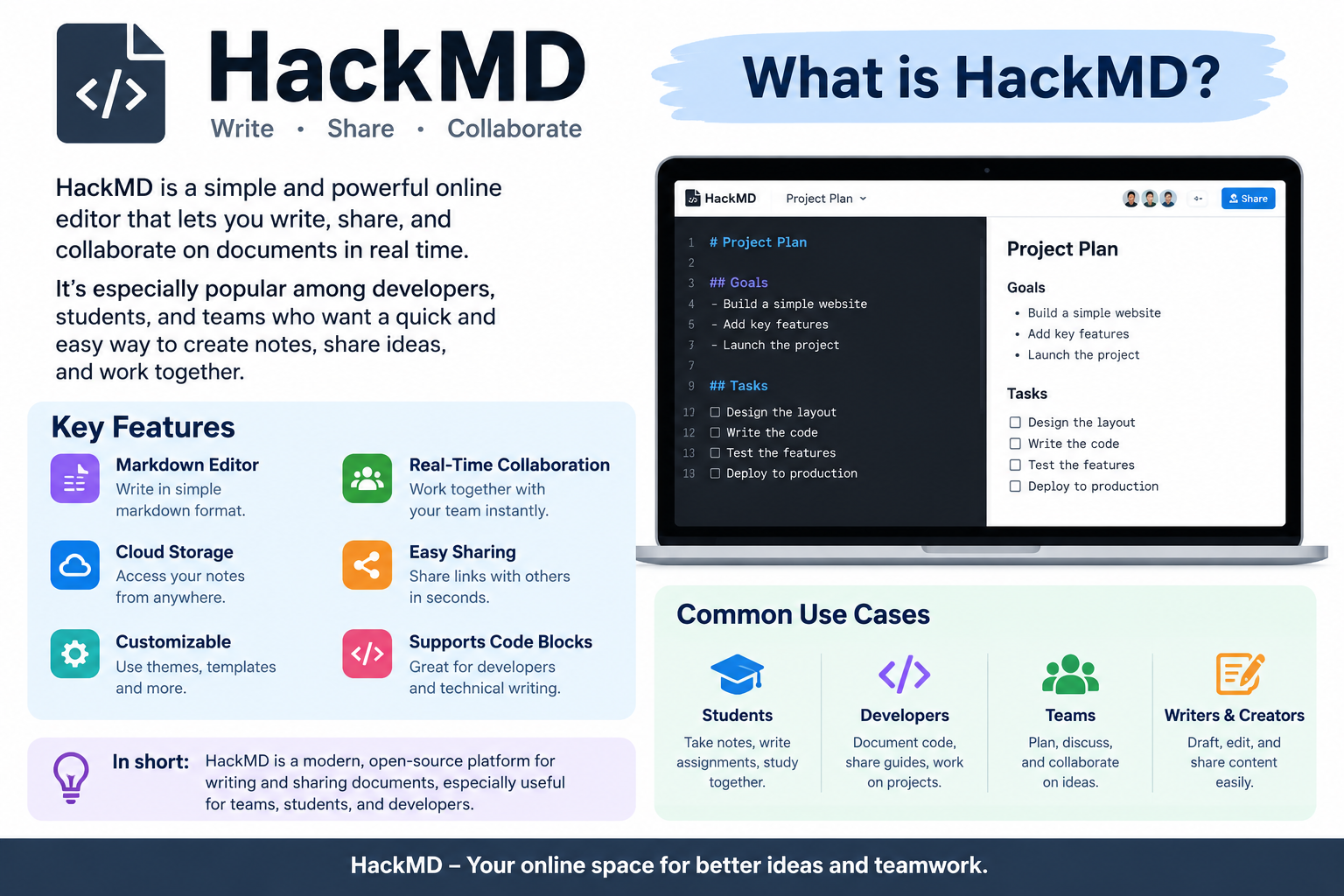

what is hackmd? HackMD is a collaborative Markdown workspace designed for writing, organizing, sharing, and discussing information online. It lets people create documents called notes and work on them together in real time. Instead of depending only on traditional word processors, HackMD uses Markdown as its main writing format, making it especially useful for developers, researchers, students, technical writers, open-source communities, and teams.
At first glance, HackMD may look like a simple online note-taking tool. However, there’s much more to it. Users can create structured documents, add code, images, tables, mathematical formulas, diagrams, comments, and other useful elements. Teams can also collaborate on shared documentation while keeping track of revisions and changes.
HackMD describes itself as a Markdown workspace for innovation and knowledge sharing. The company says the platform has grown into a service used by more than a million people around the world.
So, if you’re wondering what is hackmd and why people use it, the short answer is simple: it’s a web-based environment where people can write in Markdown, collaborate in real time, organize knowledge, and publish useful documents.
Understanding Markdown Before Learning HackMD
To understand what is hackmd, it helps to understand Markdown first.
Markdown is a lightweight way of formatting text. Instead of clicking many buttons to make a heading, bold text, list, or code block, you can use simple characters.
For example:
# Headingcreates a heading.**Bold text**creates bold text.- Itemcreates a bullet point.- Backticks can be used for code.
- Markdown can also organize links, tables, images, and other content.
The idea is to keep the writing process simple and readable.
For technical users, this can be particularly helpful because Markdown documents are easy to read even when viewed as plain text. Developers can write documentation, project notes, instructions, and technical explanations without dealing with complicated formatting menus.
HackMD takes this basic Markdown idea and adds an online collaborative environment around it.
What Is HackMD Used For?
Now that we understand the basic idea, let’s look at what HackMD can actually do.
HackMD can be used for many different types of writing and collaboration. Its official documentation highlights use cases such as taking notes, sharing findings, creating road maps, collaborating with teams, and publishing information.
Common uses include:
- Technical documentation
- Meeting notes
- Project planning
- Research notes
- Study materials
- Software documentation
- Open-source project collaboration
- Brainstorming
- Tutorials
- Road maps
- Team knowledge bases
- Presentations and slide decks
- Books and longer documents
- Public documentation
In other words, HackMD isn’t limited to one particular profession.
A student might use it for class notes. A developer might use it for project documentation. A researcher could organize findings in it. Meanwhile, a business team could use a shared workspace to document internal processes.
That flexibility is one reason the platform has attracted users from different communities.
How HackMD Works
HackMD works through a browser-based writing environment. Users create notes and can edit their content using Markdown.
One useful feature is real-time collaboration. Multiple people can work on a document together, allowing changes to appear while others are editing. HackMD’s current feature information includes live editing, multiple cursors, comments, mentions, version history, templates, and GitHub integration.
The general process looks like this:
- Create or open a HackMD note.
- Write content using Markdown.
- Add images, links, tables, code, or other elements.
- Invite other people when collaboration is needed.
- Discuss changes through comments.
- Review previous versions when necessary.
- Share or publish the finished document.
This workflow is straightforward, and that’s the point. You don’t need to wrestle with complicated software just to create organized technical content.
HackMD Notes and Documents
A central part of what is hackmd is understanding the idea of a note.
A HackMD note is an online document where users can write and organize information. Notes can be personal, shared with selected people, or published depending on the user’s needs and permissions.
A note might contain:
- Headings
- Paragraphs
- Bullet lists
- Numbered lists
- Tables
- Images
- Links
- Code blocks
- Mathematical expressions
- Diagrams
- Checklists
- Comments
This makes notes suitable for both simple and advanced projects.
For example, imagine a software team planning a new application. Instead of sending dozens of messages back and forth, the team could create a HackMD note containing the project goal, technical requirements, tasks, decisions, and questions.
Everyone can then work from the same document.
Real-Time Collaboration in HackMD
One of the biggest reasons people ask what is hackmd is its collaboration system.
Traditional documents can sometimes create confusion when several people are editing different copies. One person may have Version A, another may have Version B, and someone else may have made changes in an email attachment.
HackMD takes a different approach.
With real-time collaboration, team members can work on the same note. HackMD’s current platform describes live editing with multiple cursors and collaboration features such as comments and mentions.
This can be useful when:
- A team is writing technical documentation.
- Students are working on shared study notes.
- Developers are preparing project specifications.
- Researchers are organizing information.
- A group is brainstorming ideas.
- Editors are reviewing written material.
And, frankly, having everyone working from one current document can save a lot of headaches.
Comments, Mentions, and Discussion
Writing together isn’t always enough. Teams also need a way to discuss changes.
HackMD provides collaboration features that allow users to comment and mention other people. Its documentation also includes tools for asynchronous collaboration and suggested edits.
For example, a team member could leave a comment asking:
Can we add an example here?
Another person could respond, make the change, and resolve the discussion.
This approach keeps conversations connected to the document rather than spreading important decisions across unrelated chat messages.
For larger projects, that can make information much easier to follow.
Version History and Document Changes
Another important part of HackMD is version history.
Documents don’t always become perfect on the first try. People make changes, remove sections, rewrite paragraphs, and sometimes decide that an older version was better.
HackMD’s current platform includes version history, allowing teams to review how documents changed over time.
This can be valuable because it helps users:
- Review previous edits
- Understand how a document developed
- Recover from unwanted changes
- Track collaboration
- Review important decisions
For professional documentation, keeping a record of changes can be particularly useful.
It also creates a stronger sense of accountability because edits aren’t simply disappearing into thin air.
HackMD for Developers
HackMD has a strong connection with the developer community.
Developers often need to write documentation alongside code. A project might require installation instructions, technical specifications, API information, design decisions, troubleshooting guides, and contribution instructions.
Markdown works naturally in this environment.
HackMD supports technical content such as code blocks, mathematical expressions, diagrams, and other structured elements. Its tutorial resources also document features for creating flowcharts, Gantt charts, tables, code blocks, and mathematical content.
Developers can therefore use HackMD for:
- Software specifications
- API documentation
- Project planning
- Coding tutorials
- Meeting notes
- Architecture discussions
- Open-source documentation
- Technical research
- Development road maps
HackMD also provides developer tools and an API for integrating notes into workflows. Its developer resources describe APIs and integrations designed to help teams automate and scale collaboration.
HackMD and GitHub Integration
For developers, GitHub integration is another useful part of the platform.
GitHub is widely used for hosting and managing software projects. HackMD can connect documentation workflows with GitHub, allowing teams to work with Markdown-based knowledge alongside their development processes.
HackMD’s current platform lists GitHub integration among its collaboration features.
This can be useful when a team wants documentation and software development to stay connected.
For example, developers could prepare a technical proposal in HackMD, discuss it with their team, and connect the resulting documentation with a software project workflow.
The goal isn’t to replace GitHub. Rather, the integration can help documentation become part of the larger development process.
HackMD for Students and Researchers
You don’t have to be a programmer to use HackMD.
Students and researchers can use the platform to organize information, collaborate on projects, and create structured notes.
For students, possible uses include:
- Class notes
- Group projects
- Study guides
- Research summaries
- Presentation preparation
- Assignment planning
- Reading notes
Researchers can use it for:
- Research documentation
- Collaborative writing
- Experiment notes
- Literature discussions
- Project planning
- Technical reports
Because Markdown keeps formatting relatively simple, users can focus more on the actual information.
That’s a big advantage when the goal is to think, research, and communicate rather than spend ages adjusting fonts and spacing.
HackMD for Teams and Businesses
HackMD can also support professional teams.
A business team may need a central place for documentation that is easy to update and share. Team workspaces can provide a shared environment for collaboration, with roles and permissions controlling how members interact with notes.
Possible business uses include:
- Internal documentation
- Meeting records
- Product planning
- Technical specifications
- Employee onboarding
- Project road maps
- Team knowledge management
- Process documentation
For example, a company could create an onboarding document explaining its tools, workflows, communication methods, and basic procedures.
A new employee could then use the document as a starting point.
Public and Private Notes
An important question when learning what is hackmd is how sharing works.
Not every document needs to be public.
Some information may be suitable for public publishing, while other material should remain available only to selected collaborators.
HackMD provides note permissions and team workspace controls that help determine who can interact with documents. Its documentation covers private collaboration, public and private teams, note permissions, and external collaborators.
Before sharing a document, users should always check its permissions.
This is especially important for:
- Business information
- Unreleased projects
- Personal information
- Private research
- Internal company documents
- Security-related material
A quick permission check can prevent an embarrassing mistake later.
HackMD Publishing Features
HackMD isn’t only about private notes.
Users can also publish content for other people to read. This makes it useful for tutorials, guides, technical articles, project documentation, and public knowledge sharing.
HackMD’s official tutorial resources include publishing options and permalink features.
Publishing can turn a working document into a resource that others can access.
For example, a developer might create a tutorial about setting up a project. After reviewing it, the tutorial can be published so other developers can learn from it.
This creates a useful bridge between private writing and public knowledge.
Tables, Code, Images, and Other Content
A strong technical document usually needs more than plain paragraphs.
HackMD supports a range of content types, including tables, images, code blocks, mathematical formulas, diagrams, and other Markdown-based elements.
For example, a technical note might include:
| Content Type | Possible Use |
|---|---|
| Headings | Organizing sections |
| Tables | Comparing information |
| Code blocks | Showing programming examples |
| Images | Explaining visual ideas |
| Checklists | Tracking tasks |
| Formulas | Presenting mathematical work |
| Diagrams | Explaining systems |
| Links | Connecting useful resources |
This makes HackMD more flexible than a basic text editor.
HackMD for Presentations and Books
Another interesting feature is that HackMD can support more than ordinary notes.
Its tutorial library includes tools for creating books and slide decks.
That means a user can take structured Markdown content and turn it into a larger organized project.
A teacher, for instance, could prepare educational material as a structured document.
A developer could create a technical handbook.
A community could prepare presentation materials for an event.
The possibilities depend largely on how the user organizes the content.
HackMD and Artificial Intelligence
The modern HackMD platform is also developing around AI-assisted workflows.
HackMD currently describes Markdown as a common layer between people and AI tools. Its platform says teams can use HackMD content with tools such as Claude Code, Cursor, GitHub Actions, OpenAI, and other tools that work with Markdown.
This is important because structured documentation can provide useful context to AI systems.
Instead of storing information in a complicated format, teams can maintain knowledge in Markdown and make that content available to tools that understand the format.
HackMD also provides APIs that can be used to automate note creation and keep documentation connected to workflows.
However, AI doesn’t remove the need for human review. Teams still need to check information, approve changes, and decide what should be published.
HackMD Community and Knowledge Sharing
HackMD has also expanded its community-oriented features.
In July 2026, HackMD announced its Community feature, describing it as a way to make published public notes more discoverable. The company said the feature connects public notes from developers, educators, researchers, and teams so people can explore knowledge across the platform.
This is an interesting development because it changes the platform from being only a place where you store your own documents into a broader environment for discovering public knowledge.
Someone looking for a technical guide, research-related document, tutorial, or community resource may find useful public material.
Benefits of Using HackMD
There are several potential benefits to using HackMD.
Simple Markdown Writing
Markdown is relatively easy to learn and keeps formatting lightweight.
Real-Time Collaboration
Multiple users can work together on documents, making group projects more efficient.
Technical-Friendly Environment
Developers can work with code, diagrams, formulas, and structured documentation.
Sharing and Publishing
Documents can be shared with collaborators or published for broader audiences.
Version History
Teams can review changes and previous versions.
Integrations
HackMD provides integrations and developer tools that can connect documentation with broader workflows.
Flexible Use Cases
Students, developers, researchers, educators, and businesses can all find different ways to use the platform.
Potential Limitations to Consider
No platform is perfect for every situation.
HackMD’s Markdown-first approach can be excellent for technical and structured writing, but people who prefer highly visual word-processing tools may need some adjustment.
Some users may also prefer specialized applications for tasks such as advanced graphic design, complex spreadsheets, or sophisticated desktop publishing.
Before choosing any documentation platform, it’s smart to consider:
- The type of documents you create
- How many people need access
- Whether you need real-time collaboration
- Whether Markdown fits your workflow
- What integrations are required
- What permission controls you need
- How your team manages backups and revisions
The right tool depends on the job.
HackMD vs Traditional Word Processors
HackMD and traditional word processors have different strengths.
| Feature | HackMD | Traditional Word Processor |
|---|---|---|
| Main format | Markdown | Rich text |
| Technical writing | Strong | Varies |
| Real-time collaboration | Available | Common in modern tools |
| Code blocks | Supported | Usually less focused |
| Markdown workflow | Core feature | Often secondary |
| Documentation | Strong use case | General purpose |
| Version history | Available | Depends on platform |
| Publishing | Supported | Depends on platform |
| Developer integrations | Available | Varies |
| Structured technical notes | Well suited | Can require more formatting |
This isn’t necessarily about one tool replacing another.
Instead, it’s about choosing the right environment for the type of work you’re doing.
How to Get Started With HackMD
Getting started doesn’t need to be complicated.
A beginner can follow a simple workflow:
Create an Account
Visit HackMD and create an account if you want access to account-based features.
Create a Note
Start a new note and give it a clear title.
Learn Basic Markdown
Begin with headings, bold text, lists, links, and code blocks.
Add Useful Content
Include tables, images, checklists, or diagrams when they improve understanding.
Invite Collaborators
If you’re working with a team, share the note and configure appropriate permissions.
Review the Document
Check spelling, structure, links, formatting, and technical accuracy.
Publish or Share
When the document is ready, choose the appropriate sharing or publishing option.
HackMD’s official tutorial library provides guides covering the workspace, note creation, formatting, collaboration, permissions, publishing, and more.
Tips for Using HackMD Effectively
If you’re new to the platform, a few simple habits can make your experience smoother.
Keep Titles Clear
Use descriptive titles so people can quickly understand what each document contains.
Use Headings
Break large documents into logical sections.
Avoid Huge Blocks of Text
Short paragraphs are easier to read.
Use Tables for Comparisons
Tables can make complicated information easier to understand.
Add Comments Carefully
Comments are useful for discussion, but too many unresolved comments can become confusing.
Check Permissions
Before sharing a document, make sure the right people can access it.
Review Older Versions
If an important change causes trouble, version history can help you understand what happened.
Keep Documentation Updated
Old documentation can become more harmful than helpful. Review important documents regularly.
Who Can Benefit From HackMD?
HackMD can be useful for a wide range of people.
| User | Example Use |
|---|---|
| Developers | Technical documentation |
| Students | Shared study notes |
| Researchers | Research documentation |
| Teachers | Educational resources |
| Businesses | Internal knowledge |
| Open-source teams | Project documentation |
| Writers | Structured Markdown content |
| Community groups | Shared information |
| Project managers | Road maps and planning |
This broad range of uses helps explain why HackMD has developed beyond a simple online note editor.
Is HackMD Difficult to Learn?
For basic use, HackMD isn’t particularly difficult.
The main learning curve comes from Markdown. However, basic Markdown syntax can be learned quickly because it uses simple characters rather than complicated commands.
For example, learning how to create headings, lists, links, and bold text gives beginners enough knowledge to start creating useful documents.
As users become more experienced, they can explore advanced features such as diagrams, formulas, templates, publishing, team workspaces, integrations, APIs, and other tools.
In short, beginners can start small and learn as they go.
Why HackMD Matters for Modern Documentation
Modern teams create huge amounts of information.
Project plans, technical decisions, meeting notes, research, tutorials, product specifications, and internal guides all need to be stored somewhere.
If this information becomes scattered across emails, chat messages, local files, and different document versions, finding the correct information can become difficult.
A collaborative Markdown workspace can help bring much of that knowledge into one structured environment.
HackMD’s current platform emphasizes the idea that Markdown can serve as a common layer for people, teams, and modern development or AI workflows.
That’s a useful concept for organizations that want documentation to remain readable, structured, shareable, and connected to technical workflows.
Final Thoughts on What Is HackMD
So, what is hackmd? In simple terms, HackMD is a collaborative Markdown workspace for creating, editing, organizing, sharing, and publishing knowledge. It combines Markdown writing with real-time collaboration, comments, version history, publishing, team workspaces, integrations, and developer-focused features.
It can be useful for students, developers, researchers, teachers, writers, open-source communities, and businesses. Its strength comes from keeping structured writing relatively simple while providing tools that support collaboration and knowledge sharing.
Whether you’re preparing technical documentation, organizing research, creating study notes, planning a project, or publishing a tutorial, HackMD provides a flexible environment to get the work done.
Most importantly, what is hackmd isn’t just a question about another note-taking website. It’s a question about a different approach to documentation—one where Markdown, collaboration, organization, and knowledge sharing work together. As digital teams continue to create and share more information, that approach can remain valuable for people who want their ideas to be clear, structured, accessible, and easy to work on together.
what is hackmd: Exploring Its Advanced Features and Practical Uses
If you’re still asking what is hackmd, Part 2 takes a closer look at the platform’s practical features, advanced uses, collaboration options, and role in modern documentation. HackMD is more than a place to type simple notes. It can become a useful workspace for people who need to organize ideas, technical information, project details, and shared knowledge.
The platform’s Markdown-based approach keeps writing simple, while its collaboration tools make it possible for teams to work together. As a result, HackMD can fit into many different workflows, from small personal projects to larger technical and educational environments.
What Is HackMD for Technical Documentation?
Technical documentation is one of the areas where HackMD can be particularly useful.
Software projects often need clear explanations. A project may include installation instructions, configuration details, coding examples, troubleshooting information, and explanations of how different components work.
Instead of keeping these details scattered across separate documents, a team can organize them into structured Markdown notes.
A technical document might include:
- Project introductions
- Installation instructions
- System requirements
- Configuration examples
- API information
- Code snippets
- Troubleshooting steps
- Frequently asked questions
- Development notes
- Future plans
Good documentation should be easy to update. Since software projects can change quickly, documentation also needs to change with them.
HackMD’s collaborative environment can make this process more convenient.
Using HackMD for Meeting Notes
Meetings can generate lots of useful information, but only if someone records it properly.
HackMD can be used to create shared meeting notes before, during, and after a meeting.
A simple meeting document could contain:
| Section | Purpose |
|---|---|
| Meeting Goal | Explains why the meeting is happening |
| Participants | Records who is involved |
| Discussion | Captures important points |
| Decisions | Records agreed actions |
| Tasks | Lists work that needs to be completed |
| Questions | Stores unresolved issues |
| Follow-Up | Identifies the next steps |
Because collaborators can edit the same document, meeting notes don’t have to be rewritten later from several different sets of notes.
That’s a small change, perhaps, but it can save time.
HackMD for Project Planning
Planning a project requires more than creating a task list.
Teams often need to discuss goals, deadlines, technical requirements, risks, responsibilities, and future improvements.
HackMD can provide a central place for this information.
A project planning note might contain:
- Project overview
- Main objectives
- Team responsibilities
- Important deadlines
- Technical requirements
- Research
- Open questions
- Risks
- Milestones
- Future improvements
The document can then develop as the project develops.
For teams that prefer lightweight documentation, Markdown can provide a practical alternative to complicated project-management documents.
HackMD and Knowledge Management
Knowledge management means collecting, organizing, and maintaining useful information.
For a business, this might include company procedures. For a software team, it might include development instructions. For a research group, it could include findings and working notes.
HackMD can help create a central collection of documents.
For example, a small technology team might maintain separate notes for:
- New employee onboarding
- Coding standards
- Deployment instructions
- Product requirements
- Troubleshooting
- Meeting decisions
- Research
- Frequently asked questions
When information is organized properly, team members don’t have to repeatedly ask the same questions.
In other words, documentation can become a shared memory for the organization.
What Is HackMD for Brainstorming?
Brainstorming works best when people can quickly record ideas without worrying too much about formatting.
HackMD’s simple writing environment can support this type of activity.
A brainstorming document might begin with a basic question:
How can we improve this product?
Team members could then add ideas, examples, concerns, and possible solutions.
Later, the team can organize those ideas into categories.
For example:
- Product improvements
- Marketing ideas
- Customer needs
- Technical solutions
- Design concepts
- Future features
The document can gradually move from a messy collection of ideas into a structured plan.
Sometimes, you’ve got to get the ideas out first and organize them later.
Using Markdown More Effectively
If you’re learning what is hackmd, understanding Markdown will make your experience much easier.
Here are some basic Markdown elements:
| Markdown | Purpose |
|---|---|
# Title | Main heading |
## Section | Subheading |
**text** | Bold text |
*text* | Italic text |
- item | Bullet list |
[text](link) | Hyperlink |
`code` | Inline code |
> quote | Blockquote |
These simple commands can create organized documents without requiring complicated formatting tools.
Once you understand the basics, you can explore more advanced Markdown features and HackMD-specific tools.
Creating Better Technical Notes
A good technical note shouldn’t simply contain lots of information.
It should help readers find the information they need.
One effective structure is:
Start With the Purpose
Explain what the document is about.
Add Background
Give readers enough context to understand the subject.
Explain the Main Process
Break complicated tasks into clear steps.
Include Examples
Examples can make technical concepts easier to understand.
Add Troubleshooting
Explain common problems and possible solutions.
Keep It Updated
Review the document when the project changes.
This structure can make a technical note much more useful than a large wall of text.
HackMD for Educational Collaboration
Teachers and students can also use collaborative documents for learning.
A teacher could prepare a shared lesson document containing explanations, examples, questions, and exercises.
Students could then contribute their own notes or questions.
Group assignments can also benefit from a shared workspace.
For example, a student team preparing a research project could use one note for:
- Research questions
- Sources
- Findings
- Draft content
- Team comments
- Presentation ideas
- Final conclusions
Everyone can work from the same information instead of maintaining separate copies.
What Is HackMD’s Role in Open-Source Projects?
Open-source projects depend heavily on communication and documentation.
Contributors may live in different countries and work at different times. Clear documentation helps everyone understand the project.
HackMD can be useful for drafting:
- Technical proposals
- Project road maps
- Contributor guides
- Meeting notes
- Design discussions
- Feature plans
- Research documents
Because Markdown is already common in software development, it fits naturally into many open-source workflows.
The connection with GitHub can also help teams integrate documentation into their development processes.
HackMD Templates
Starting with a blank page can sometimes be surprisingly difficult.
What should the document include? Where should the headings go? Which information matters?
Templates can help solve that problem.
HackMD provides templates and tutorial resources that can help users get started with different types of documents.
A template can provide a basic structure for:
- Meeting notes
- Project planning
- Technical documents
- Research
- Presentations
- Tutorials
Instead of starting from scratch, users can modify an existing structure.
This can improve consistency when a team creates many similar documents.
What Is HackMD’s Importance for Remote Teams?
Remote teams need strong communication systems because team members aren’t always sitting in the same office.
A shared document can give everyone access to the same information.
For example, a remote development team could use HackMD for weekly planning.
Each meeting could have:
- Current progress
- Problems
- Decisions
- Tasks
- Questions
- Next steps
Team members can read the document before the meeting and add information afterward.
This creates a written record that can be useful for people who couldn’t attend.
Organizing Large HackMD Workspaces
As the number of documents increases, organization becomes important.
A workspace with hundreds of notes can become difficult to manage if everything has random titles.
Good organization starts with clear naming.
For example, instead of:
Project Notes
you might use:
Mobile App — Authentication Design — September
A consistent naming system makes searching easier.
You can also organize documents around projects, teams, or subjects where appropriate.
The exact approach will depend on how your organization works.
Search and Discoverability
Documentation is only useful when people can find it.
A strong knowledge system therefore needs good discoverability.
When creating HackMD notes, use:
- Clear titles
- Descriptive headings
- Useful keywords
- Consistent terminology
- Logical document structures
This helps readers understand what a document contains before they even start reading it.
For public documentation, discoverability becomes even more important because new readers may have no previous knowledge of the project.
Collaboration Etiquette in HackMD
Technical tools don’t automatically create good teamwork.
People still need good collaboration habits.
When working with others, try to:
- Keep comments relevant.
- Avoid unnecessary changes.
- Explain major edits.
- Respect other contributors.
- Use clear language.
- Resolve completed discussions.
- Check important information before publishing.
A shared document works best when everyone treats it as a collaborative workspace rather than a personal notebook.
What Is HackMD for Writers?
HackMD isn’t limited to technical users.
Writers can use Markdown-based tools to draft structured content.
For example, a writer could create:
- Article outlines
- Research notes
- Interview questions
- Draft chapters
- Content plans
- Editorial notes
- Reference material
Markdown can also make it easier to move content between different systems that support the format.
For writers who regularly create online or technical content, this can be particularly useful.
HackMD for Documentation Teams
Large organizations often have dedicated documentation teams.
These teams may create product guides, developer documentation, support information, and internal resources.
A collaborative Markdown environment can help writers and technical experts work together.
A developer might provide technical information while a writer improves the explanation for a broader audience.
Comments and collaborative editing can keep the conversation connected to the actual document.
This can reduce the back-and-forth that often happens when documents are passed between different teams.
Security and Permissions
Security should always be considered when choosing a collaboration platform.
Not every document should be publicly accessible.
Teams should understand:
- Who can view a note
- Who can edit it
- Who can share it
- Whether the document contains sensitive information
- Which collaborators have access
- What publishing settings are active
HackMD provides permission and workspace controls, but users still need to configure those settings carefully.
A useful rule is simple: share only what needs to be shared.
What Is HackMD Compared With a Simple Text Editor?
A basic text editor lets you type text.
HackMD goes further by providing an online collaborative environment around Markdown.
A simple text editor might be useful for writing a quick note locally. HackMD is more focused on documents that need collaboration, organization, sharing, publishing, and technical formatting.
The difference becomes clearer when multiple people need to work on the same document.
Instead of emailing a file back and forth, collaborators can work from a shared online version.
What Is HackMD Compared With a Traditional Wiki?
A wiki is generally designed for organizing a large collection of interconnected information.
HackMD can also be used for knowledge sharing and documentation, but its core experience centers around Markdown notes and collaborative editing.
The two approaches can overlap.
For example, a team might use a structured knowledge base for permanent documentation while using HackMD notes for drafts, discussions, research, and collaborative planning.
The best choice depends on the team’s needs.
How Businesses Can Create a Documentation Culture
Technology alone doesn’t create good documentation.
People need to develop a habit of recording useful information.
A company can encourage this by asking employees to document:
- Important decisions
- Common procedures
- Project knowledge
- Troubleshooting solutions
- Lessons learned
- Technical changes
Over time, these small contributions can create a valuable knowledge library.
HackMD can become one part of that process.
The key is consistency.
Common Mistakes New HackMD Users Make
Beginners can make a few common mistakes.
Creating Unclear Titles
A vague title makes future searching difficult.
Writing Without Structure
Large blocks of text can be difficult to navigate.
Ignoring Permissions
Private information should not accidentally become public.
Forgetting Updates
Old instructions can become misleading.
Overusing Formatting
Too much formatting can make documents harder to read.
Keeping Important Knowledge Only in Personal Notes
Information that a team needs should generally be documented somewhere accessible to the appropriate people.
Avoiding these problems can make your workspace much more useful.
A Simple HackMD Workflow for Beginners
If you’re completely new to HackMD, try this simple workflow:
Create → Write → Organize → Collaborate → Review → Share
Start with a basic document.
Write your information using Markdown.
Add headings and lists to organize it.
Invite collaborators if necessary.
Review the content carefully.
Then share or publish it according to your needs.
You don’t need to learn every feature on day one.
Start small and build your skills gradually.
The Future of Markdown Collaboration
Markdown remains popular because it’s simple, portable, and readable.
At the same time, modern teams increasingly work with cloud-based collaboration, APIs, automation, and artificial intelligence.
Platforms such as HackMD sit at the intersection of these trends.
The idea is straightforward: keep information in a structured, human-readable format while making it useful for people, teams, software tools, and emerging AI workflows.
As documentation becomes more important, lightweight formats may continue to play a meaningful role.
Final Thoughts: What Is HackMD?
So, what is hackmd? It’s a collaborative Markdown workspace that can support writing, technical documentation, research, education, project planning, knowledge management, and public information sharing.
Its value isn’t simply that users can type Markdown.
The bigger idea is bringing writing and collaboration together in a flexible online environment.
For beginners, HackMD can start as a simple note-taking tool. For developers and teams, it can become a much broader documentation workspace.
With clear organization, thoughtful collaboration, sensible permissions, and regular updates, users can turn simple notes into useful sources of shared knowledge.
Ultimately, what is hackmd can be answered in one practical sentence: HackMD is a Markdown-focused collaborative workspace designed to help people create, improve, organize, and share knowledge together.
Discover more insightful articles, helpful updates, and engaging stories on Leo ART New, and stay connected with the latest information. For more details, Contact Us.